
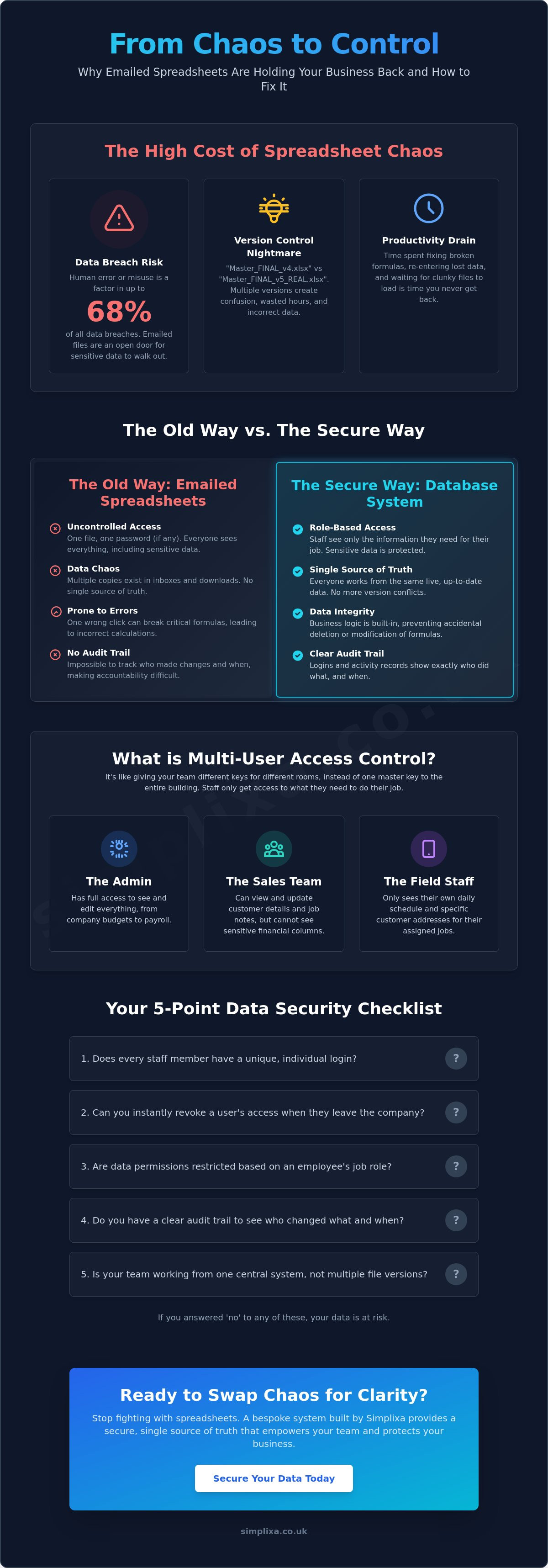
You’ve just hit send on "Master_Sheet_FINAL_v4_REVISED.xlsx" to the whole team. Within minutes, someone has broken a critical formula, and another staff member is looking at sensitive figures they were never meant to see. It is a massive headache you simply don't need. Relying on emailed files is a recipe for disaster. Recent data shows that the human element, including simple errors and access misuse, is a factor in up to 68% of all data breaches. Implementing multi-user access control for business data isn't just a tech upgrade. It is about protecting your livelihood.
We know the frustration of watching a clunky file crawl to a halt whilst you are trying to get a job finished. You need a single source of truth that actually stays true. This guide shows you how to swap the spreadsheet chaos for a secure, simple system. You will discover how individual logins and restricted permissions keep your data safe and your team focused. We will look at how to move from "Final_v2_REAL_FINAL" to a streamlined setup that gives you your time back and total peace of mind.
Key Takeaways
- Stop the "Reply All" nightmare and version control chaos by ditching shared spreadsheet files for good.
- Understand how multi-user access control for business data lets you set specific roles, ensuring staff only see the information they actually need.
- Discover why a database-driven system prevents broken formulas and keeps your team working from one single source of truth.
- Use our practical checklist to audit your current security, focusing on unique logins and restricted access for different team members.
- Learn why bespoke tools offer a better fit for your daily workflow than clunky, off-the-shelf software licenses.
Beyond the Email Chain: Why Sending Spreadsheets is a Risk
Emailing spreadsheets is the default for many UK businesses. It feels quick. It feels free. But it’s actually a trap. Once you hit send on that attachment, you’ve lost control of your most valuable asset. That file is now sat in various inboxes, downloads folders, and potentially on personal devices. It's the opposite of secure. Implementing multi-user access control for business data is the only way to pull your information back into a safe, central space.
The "Reply All" disaster is a classic for a reason. One tired click and your private profit margins or staff salaries are visible to the whole team. Or even worse, they're sent to a client by mistake. Even if you avoid that, you still face the version control nightmare. Three people open the file at once. They all make changes. Suddenly, you have three different "Master" files. You end up spending hours manually copying and pasting rows just to find the truth. It's a massive drain on your time and your sanity.
There’s a hidden financial cost here too. Every minute spent fixing a broken formula or re-entering data that didn't save is money down the drain. These clunky files grow heavy. They lag. They crash. It’s a physical weight on your business that stops you from moving fast and serving your customers.
The Security Gap in Your Inbox
Slapping a password on an Excel file provides a false sense of security. These passwords are often weak and easily bypassed with basic software. The real danger comes when staff move on. If your client list is just a file in an inbox, a departing employee can take your entire database with them in seconds. Under UK GDPR rules, this lack of control is a serious risk. You need the ability to revoke access the moment someone leaves the business. Using Role-Based Access Control allows you to organise permissions by job title, keeping sensitive data strictly on a need-to-know basis.
The Mental Burden of "Master Files"
We’ve all seen it. The one "Master File" that only one person truly understands. If they are off sick or on holiday, the business grinds to a halt. Other staff members live in fear of clicking the wrong cell and "breaking" the system. This anxiety kills productivity. It makes people hesitant and slow. Moving to a system designed for multi-user access control for business data provides instant relief. It removes the gatekeeper. It lets your team do their jobs without the constant worry of causing a digital collapse. It’s about moving from a state of chaos to a state of complete organisation.
What is Multi-User Access Control for Business Data?
Think of your business information as a high-security building. In the old world of spreadsheets, you essentially gave every staff member the same master key. They could enter any room, open any safe, and potentially move the furniture around without you ever knowing. Multi-user access control for business data changes that. It acts as a digital bouncer, ensuring that every person who enters your system has the right level of clearance for their specific job.
Sharing a single password amongst the whole team is a recipe for disaster. If something goes wrong, you have no way of knowing who was responsible. Individual logins solve this instantly. When every staff member has their own secure entry point, you gain accountability. You can see exactly when a record was updated or a quote was sent. This is the power of an audit log. It’s not about spying; it’s about having a clear trail of breadcrumbs so you can fix mistakes before they become expensive problems.
If you’re tired of the spreadsheet shuffle, a custom CRM software setup can handle all this heavy lifting for you, keeping your data tidy and your mind at ease.
Role-Based Access Control (RBAC) Explained
RBAC is just a fancy way of saying "different keys for different people." You don't need a tech degree to set this up. For example, your Office Admin might have "Admin" rights to see the entire company budget and payroll. However, your field staff only need to see their own daily shifts and customer addresses. By assigning these roles, you prevent accidental deletions. A worker can’t delete a master invoice if they don't even have the button to do so. It keeps things simple and safe.
Granular Control: Seeing Only What Matters
Sometimes, you want a staff member to see a page but not every detail on it. This is where granular control comes in. You can hide sensitive columns, like profit margins or home phone numbers, whilst still letting the team see the job notes they need. This "Need to Know" approach stops staff from feeling overwhelmed by irrelevant data. It creates a cleaner workspace where they can focus on their tasks without getting distracted by the bigger picture. This is the core of multi-user access control for business data: giving people exactly what they need to succeed, and nothing more.
Spreadsheet vs. Database: Moving to a Single Source of Truth
A spreadsheet is what techies call a "flat" file. Think of it like a single sheet of paper that everyone in the office is trying to write on at the same time. It works fine when it's just you, but as soon as you add a team, the edges start to fray. If one person accidentally deletes a column or messes up a calculation, the whole thing is ruined for everyone. It’s a fragile way to run a growing business. Moving to a database changes the game entirely. Instead of passing a file around like a hot potato, you create a central engine where your data lives safely.
The biggest relief of a database is the end of the "Read Only" nightmare. We’ve all been there. You need to update a quote urgently, but a box pops up saying the file is locked for editing by another user. You’re stuck waiting whilst they finish their lunch. With multi-user access control for business data, that frustration vanishes. Everyone can log in at once. You can edit a customer’s address whilst your colleague is updating an invoice on the same record. It’s seamless, fast, and removes the constant stop-start nature of spreadsheet life.
Scalability is the other hidden win. Spreadsheets start to chug and lag once you hit a few thousand rows. They become bloated, slow, and prone to crashing your computer. A proper database handles hundreds of thousands of rows without breaking a sweat. It stays snappy, meaning you can actually find the information you need in seconds rather than waiting for a loading bar to crawl across the screen.
When to Move from Excel to a Database
There is usually a tipping point where the spreadsheet stops being a tool and starts being a burden. If you find yourself checking "Date Modified" to see which file is the newest, or if you’ve started hiding columns so staff don't "accidentally" change things, you’ve reached it. It’s time to look at a proper web-based system. For a deeper dive into these warning signs, check out our guide on When to Move from Excel to a Database. A shared drive is just a digital filing cabinet; a database is a smart assistant that works for you.
Data Integrity and Automated Backups
Databases are built with "rules" that spreadsheets simply don't have. You can set a box so it only accepts a valid UK postcode or a numerical price. This prevents the "human element" from typing a name into a profit column and breaking your monthly report. Multi-user access control for business data also includes the safety net of automated cloud backups. If a mistake does happen, you can roll back to an earlier version in clicks. True data integrity means you can finally trust your numbers again without second-guessing every cell.
The SME Checklist: 10 Essentials for Secure Data Access
You’ve seen the risks. You know why databases win. Now, it’s time to look at your own setup with a critical eye. Most small businesses in the UK are sitting on a data time bomb without even realising it. This isn't about complex IT audits or expensive consultants. It's about basic common sense and security. If you want to move away from the spreadsheet shuffle, your new system needs to tick these boxes.
- Unique Logins: Does every staff member have their own username and password? If you’re sharing a single login, you have zero accountability.
- Restricted Permissions: Can you hide specific pages or sensitive figures? You don't want the new apprentice accidentally seeing the full company P&L.
- Audit Trails: Is there a record of who changed what? You need to be able to trace a mistake back to its source to fix it.
- Conflict Prevention: Does the system stop two people from overwriting each other’s work? No more "File in Use" messages or lost data.
- UK Compliance: Is your data hosted in a secure, UK-compliant cloud? Keeping data on a random USB stick or a local hard drive is a massive GDPR risk.
Implementing multi-user access control for business data is the only way to ensure these essentials are met. It’s about building a foundation that allows your business to grow without the constant fear of a digital collapse. If your current system fails more than two of these points, you are working harder than you need to.
Evaluating Your Current Risk
Look for the red flags. If you see filenames like "Master_Sheet_2024_v3_FINAL," you are already in the danger zone. These are signs that your data is fragmented and unreliable. You can learn more about these warning signs in our guide on How to Stop Manual Data Entry Errors. Then, apply the "Bus Test." If the person who built your master spreadsheet left tomorrow, would your business survive? If the answer is no, your information is a liability, not an asset.
Choosing the Right Tool
Your team needs to actually use the system for it to work. If it’s too "techy" or complicated, they will just go back to their old ways. Look for a tool that offers mobile access so field staff can update jobs whilst on-site. It should also talk to your other essential tools, like your accounting software. A system that doesn't integrate just creates more manual work. If you’re ready to stop the chaos, a custom staff tracking app can give you the control and peace of mind you’ve been looking for.
True multi-user access control for business data isn't a luxury. It is a necessity for any UK business that values its time and its reputation. It’s time to move past the spreadsheet trap and embrace a system that actually supports your growth.
Simplixa’s Approach: Custom Tools Built for Your Team
Most off-the-shelf software feels like a pair of shoes that does not quite fit. You either get a system that is too complex for your needs or one that lacks the one specific button you actually use every day. SIMPLIXA does things differently. We do not sell generic licences. We build bespoke tools that mirror your actual workflow. We take those messy Excel files and outdated paper forms and turn them into a clean, simple app that your team will actually enjoy using.
A central part of our build process is implementing multi-user access control for business data that makes sense for your specific hierarchy. We do not just give everyone the same view. We sit down and work out which staff members need to see what. This keeps your sensitive figures private and your team’s workspace uncluttered. We also take the "IT headache" off your plate. SIMPLIXA handles the hosting, security, and ongoing support. You do not need to worry about server updates or data backups; we’ve got it covered.
Transparency is at the heart of how we work. Unlike many agencies with opaque invoicing, we provide a fixed price for your project. You know exactly what you are paying for from the start. No hidden "per-user" fees that punish you for growing your team. It’s a fair, no-nonsense approach designed for independent operators who value speed and utility over corporate bloat.
Systems That Grow With You
We build for your needs today, but we leave the door open for tomorrow. You might start with a custom staff tracking app to solve your immediate scheduling chaos. As your business expands, we can add inventory modules or automated quoting tools to the same system. This flexibility provides a massive sense of relief. You are not stuck with a "dead-end" tool. For more on this, read our guide on How to Scale Business Operations Without More Staff. It’s about building a foundation that just works, year after year.
Getting Started is Simpler Than You Think
Our process begins with a "Discovery" phase. We do not start with code; we start by listening to your daily frustrations. We want to know about the spreadsheets that crash and the data entry tasks that eat your evenings. Once we understand the burden, we move fast. We can often take you from spreadsheet chaos to a secure, custom app in weeks, not months. Multi-user access control for business data becomes the new normal for your team, and the "Final_v2" files become a distant memory. Ready to kill the spreadsheet? Book a chat with SIMPLIXA today.
Ditch the Spreadsheet Chaos Today
You’ve lived with the "Master_v4" nightmare for long enough. It is a physical weight on your business that slows you down and keeps you up at night. Moving to a single source of truth isn't just about better tech. It's about giving your team the freedom to work without the constant fear of breaking a critical formula or seeing sensitive figures. By implementing multi-user access control for business data, you turn your information from a risky liability into a streamlined asset.
At Simplixa, we are specialists in SME operational tools. We don't do hidden fees, opaque pricing, or complex software licenses. You get clear, fixed-price project costs and direct support from our UK-based development team. We handle the technical heavy lifting and secure hosting so you can focus on running your business. It’s time to move past the "Read Only" errors and the dangerous email chains for good.
Stop the spreadsheet stress and build a secure system with Simplixa
You are only a few weeks away from a system that actually fits your workflow and gives you total peace of mind. Let's get it sorted.
Frequently Asked Questions
How do I restrict access to specific columns in a shared spreadsheet?
You cannot effectively hide specific columns from certain users in a standard spreadsheet without them being able to bypass the protection easily. Whilst you can "hide" or "protect" cells, anyone with access to the file can often find a workaround. For true security, you need a database where sensitive data simply isn't sent to the user's screen unless they have the correct permissions.
Is it safe to share business data via Google Sheets or OneDrive?
It is safer than emailing attachments, but it still leaves your information vulnerable to simple human error. If a staff member accidentally shares a link with the wrong permissions, your private data could be exposed to anyone. These tools lack the granular multi-user access control for business data required to keep sensitive figures like profit margins truly private and secure.
What is the best secure alternative to sending spreadsheets via email?
A custom web-based app or database is the most secure way to stop the email chain for good. Instead of sending a file, you give every staff member a unique, secure login to a central system. This ensures everyone is working from a single source of truth. It removes the risk of version control chaos and keeps your master client list from being copied onto personal devices.
How much does it cost to move from Excel to a custom multi-user system?
The cost varies based on the complexity of your current spreadsheets and the specific features your team needs. We focus on fixed-price projects so you don't have to worry about costs spiralling out of control. By avoiding per-user license fees, we ensure the system remains affordable as your business grows. You should always look for a partner who provides a clear, transparent quote upfront.
Can I track who made changes to my business data?
Yes, a professional system with multi-user access control for business data includes a full audit trail. This logs exactly which staff member made a change and what time they did it. It provides total accountability for your team and makes it simple to fix mistakes. You will never have to guess who updated a quote or deleted a job record again.
What happens to our data if our internet goes down?
Your data remains safe and securely backed up in the cloud, even if your local connection drops. You will typically need an internet connection to access the system, but your information is never at risk of being lost. Because the data isn't stored on a single office computer, a local power cut or hardware failure won't stop your business from functioning once you are back online.
Do I need a server in my office to have a multi-user database?
No, you don't need any expensive hardware or noisy servers taking up space in your office. We use secure cloud hosting, which means your system is accessible from any laptop, tablet, or smartphone. This removes the burden of on-site maintenance. It also ensures your business information is protected by professional-grade security in a UK-compliant data centre.
How long does it take to build a custom app for my staff?
We typically take a project from the first conversation to a finished tool in weeks, not months. Because we specialise in SME operations, we avoid the slow, bloated processes of traditional tech agencies. We focus on getting you away from spreadsheet chaos as quickly as possible. You can expect a streamlined delivery that focuses on utility and speed so you can feel the relief of being organised sooner.