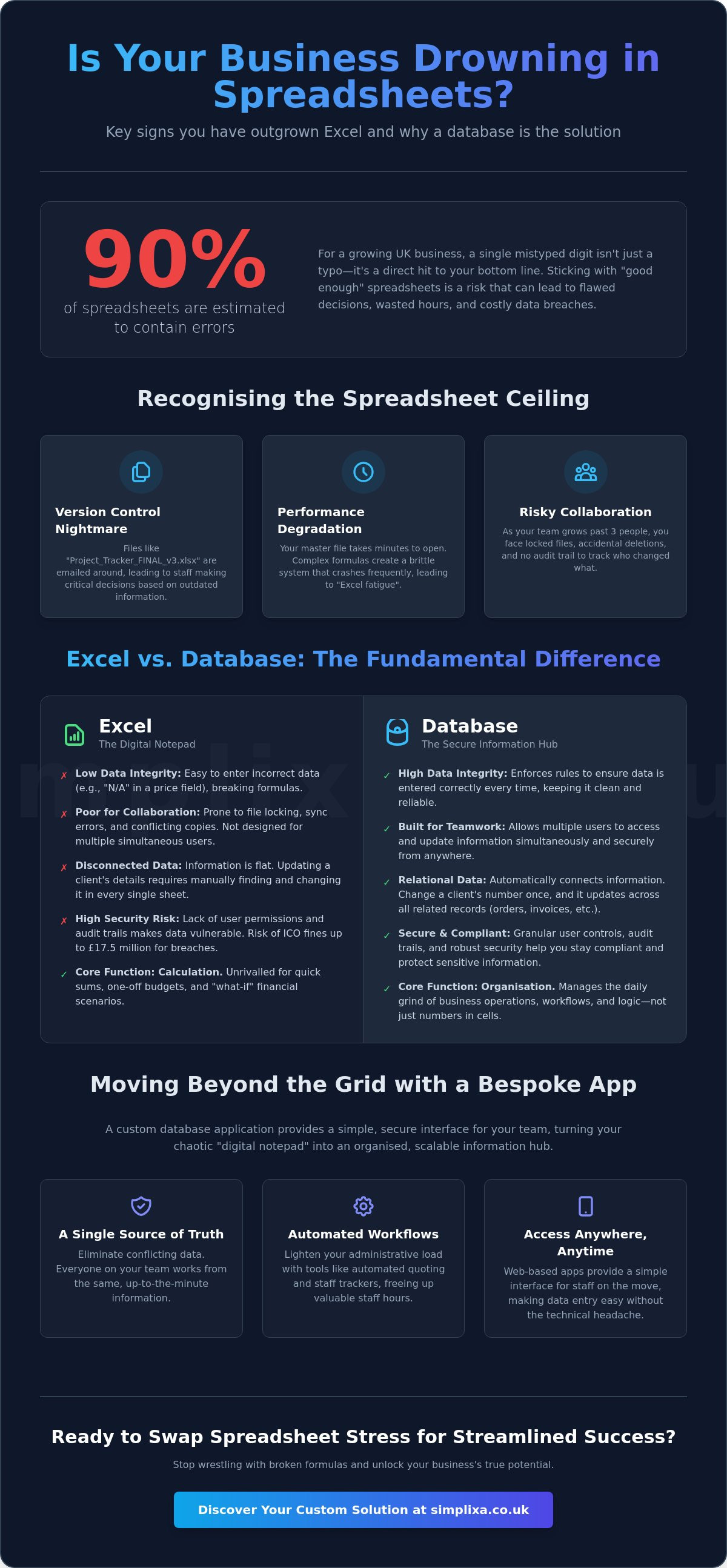

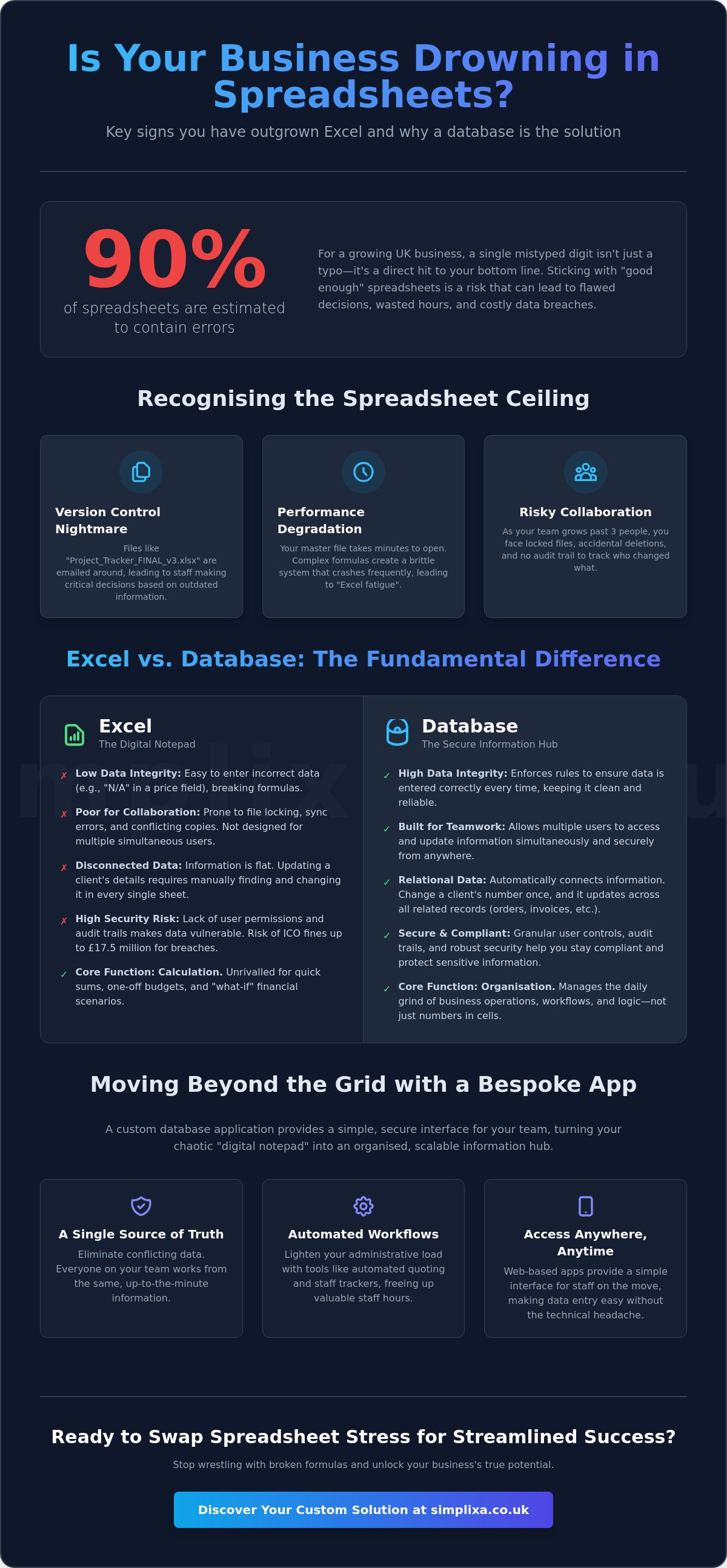
Did you know that almost 90% of spreadsheets contain errors? For a growing UK business, a single mistyped digit isn't just a typo. It's a direct hit to your bottom line. You've likely felt the frustration of a file that takes ages to open or the dread of seeing "Version_FINAL_v2_USE_THIS_ONE.xlsx" in your shared folder. Understanding when to move from excel to a database is the difference between a business that scales and one that stays trapped in a mess of broken formulas.
We know how it feels to be held hostage by a complex grid that only one staff member understands. Excel is a brilliant calculator, but it's a poor organiser for managing people and assets. With the Information Commissioner's Office now able to issue fines of up to £17.5 million for data breaches, sticking with "good enough" spreadsheets is a risk you don't need. It's time for some relief.
This guide shows you the exact signs you've hit the spreadsheet ceiling and how to transition to a secure system without the technical headache. We'll explore how to stay compliant with the Data (Use and Access) Act 2025 and how custom tools like automated quoting or staff trackers can finally lighten your administrative load for good.
Key Takeaways
- Learn the "Rule of Three" to identify exactly when to move from excel to a database based on your team size and error frequency.
- Understand how "Relational Data" connects your customers, orders, and staff automatically to stop the nightmare of duplicate entries.
- Calculate the true cost of manual data entry and see how many staff hours your business is currently wasting on "spreadsheet wrestling".
- Discover how custom business apps provide a simple interface for staff on the move, making data entry easy without the technical headache.
- Shift from a "digital notepad" to a secure, organised information hub that scales as your UK business grows.
Recognising the Spreadsheet Ceiling: Signs You Have Outgrown Excel
Every business starts with a spreadsheet. It is the default choice for a reason. It is flexible, familiar, and basically free. But there is a specific point where that helpful grid stops being a tool and starts being a daily faff. You know the feeling. You spend more time fixing broken formulas than actually looking at the numbers. This is what we call the "spreadsheet ceiling". Understanding when to move from excel to a database isn't about hitting a technical limit. It is about noticing when your administrative processes are holding back your growth and giving you a headache.
Excel was originally built for one person to work on at a time. Once your team grows to three or more people, the system starts to buckle. You end up with "locked" files because someone left their computer on over lunch. Or worse, you find "don't touch this cell" warnings written in red text across the top of the sheet. One accidental deletion by a trainee can ruin a week of work. You don't have an audit trail. You don't know who changed what. It is a high-stakes guessing game that puts your revenue and your sanity at risk.
The Version Control Nightmare
Have you ever spent an hour updating a price list, only to realise you were working on an old version? It is a common nightmare for independent operators. Files like "Project_Tracker_FINAL_v3.xlsx" fly around via email, creating a chaotic trail of misinformation. Staff end up making critical decisions based on outdated data whilst the real numbers are buried in someone else’s inbox. Shared workbooks were supposed to fix this. In reality, they are often more trouble than they are worth. They lag, they sync poorly, and they frequently lock everyone out at the worst possible moment. It is a mess that stops your team from doing their actual jobs.
Performance Degradation and Crashing
A clear sign that you have outgrown your current setup is the "loading spin". If your master file takes two minutes to open, something is wrong. Complex formulas and external links create a brittle system that crashes if you look at it wrong. This leads to "Excel fatigue". Staff stop recording data because the file is too slow to bother with. You lose visibility and you lose control. When scrolling through rows feels like an Olympic sport, it is a sign you need a proper home for your information. Recognising when to move from excel to a database allows you to trade that "loading" icon for a system that actually works at the speed of your business.
Excel vs Database: Understanding the Fundamental Difference
Think of Excel as a digital notepad. It's brilliant for scribbling down a quick sum or a one-off budget. But a database? That's a secure, permanent home for your business information. The main reason people ask when to move from excel to a database is because they've realised their notepad is full of messy, disconnected notes. Databases are built to handle relationships. If you change a client's phone number in a database, it updates on their invoices, their project tracker, and their contact card instantly. You don't have to hunt through tabs to find every mention of them. It's about working smarter, not harder.
Data integrity is another massive win. In Excel, anyone can type "N/A" into a box meant for a price, which breaks your formulas. A database won't let that happen. It forces users to enter information correctly every single time. It's about setting boundaries so your data stays clean. Plus, because modern databases are usually web-based, your team can access them from anywhere. You aren't tethered to a single laptop or a clunky file on a server. It's about freedom and accuracy. If you're tired of cleaning up messy rows, looking into a custom business app might be the relief you need.
Calculation vs Organisation
Excel is unrivalled for "what-if" scenarios. If you want to see how a 5% price hike affects your yearly profit, use a spreadsheet. However, a database is built for the daily grind of operations. It manages workflows, not just cells. A database is a system that organises business logic, not just cells. This structural difference solves many of the limitations of spreadsheets that keep independent operators working late on admin. It moves you from a state of being overwhelmed to a state of complete organisation.
The "Single Source of Truth"
Conflict is a common symptom of a growing business. One department has an old version of a file, whilst another has the "new" one. A database provides a single source of truth. Everyone looks at the same central record. You can even give people different "views" based on their job. Your staff might only see their daily tasks, whilst you see the overall profit margins. Everything stays in sync, in real-time, across the entire business. Deciding when to move from excel to a database is often just a matter of deciding you've had enough of conflicting records and guesswork. It's time to put the information where it belongs.
The Hidden Risks of the "Good Enough" Spreadsheet
Sticking with a "good enough" spreadsheet is like ignoring a slow puncture. You are still moving, but it is costing you more fuel and ruining the tyres. For many independent operators, the biggest risk isn't a total system crash. It is the slow, quiet drain on your time and money. You might think you're saving cash by avoiding new software, but the reality is often the opposite. Every hour a staff member spends "wrestling" with a clunky file is an hour you've paid for that didn't generate revenue. It is a hidden tax on your growth.
Business continuity is another massive worry. What happens if the person who built your "master tracker" leaves the company tomorrow? Usually, the business grinds to a halt. You're left with a complex web of formulas that no one else understands or can fix. It is a massive vulnerability that keeps you tied to specific people rather than a reliable system. A database removes this "guru" dependency. It makes your operations transparent and repeatable. If you ever plan to sell your business or step back from the daily grind, a buyer wants to see an asset, not a folder full of fragile files. Spreadsheets make your business harder to scale because they don't grow; they just get more bloated.
Data Security and Compliance
With the Data (Use and Access) Act 2025 now in force, "good enough" is a legal gamble. An unencrypted Excel file sitting on a staff member's personal laptop is a GDPR breach waiting to happen. The Information Commissioner's Office (ICO) can impose fines of up to £17.5 million for serious slip-ups. Unlike a loose file, a database provides proper access controls and audit trails. You'll know exactly who changed a record and when. It is about total peace of mind and meeting UK standards without the technical headache. Knowing when to move from excel to a database is essentially about deciding when you're ready to stop taking risks with your clients' sensitive information.
The Cost of Administrative Errors
Errors are expensive. Missed invoices, double-booked appointments, or forgotten follow-ups aren't just annoying. They are lost revenue. Because research shows that almost 90% of spreadsheets contain mistakes, the mental toll on owners is huge. You feel you must double-check everything personally because you don't trust the grid. You shouldn't have to stay late to verify a cell. Moving to a dedicated system for tracking assets and equipment removes the guesswork. Understanding when to move from excel to a database means finally trusting your data again. It is the only way to stop the "double-check" cycle and get your evenings back for good.
When to Make the Jump: A Strategic Decision Framework
Deciding when to move from excel to a database shouldn't feel like a shot in the dark. You need a clear signal. We use the "Rule of Three" as a simple gut check for independent operators. If you have three or more people needing to edit data, three months of heavy records piling up, or you've spotted three recurring errors this month, the ceiling has been hit. It's that simple. You've moved past the "digital notepad" stage and into the territory where a proper system is required to keep the wheels turning.
Another sign is the "scrolling test". If your morning involves scrolling through hundreds of rows just to find one client record, you've outgrown the tool. Searching should be instant, not a chore. You also need to look at your workflow. Does your data need to actually *do* something? Excel is passive. A database can be active. For example, an automated quoting tool can take your data and turn it into a professional PDF for a client in seconds. If you're still copy-pasting between tabs to get a quote out, you're working for the tool, not the other way around.
Finally, take the "Growth Test". Imagine you landed a big contract tomorrow that increased your customer base by 20%. Would your current spreadsheet survive, or would it buckle under the pressure? If the thought of more data makes you break into a cold sweat, it's time to act. Don't wait for the system to crash before you start looking for a solution. It's about being proactive rather than reactive.
The Spreadsheet vs Database Checklist
Still not sure? Ask yourself these four questions. If you answer "Yes" to two or more, it's time to move.
- Do multiple staff members need to update records at the same time?
- Do you need to access your data securely whilst out on a job via a mobile phone?
- Do you spend more than an hour a week "fixing" or re-formatting your data?
- Are you worried about sensitive client info sitting in a file that anyone could copy?
Planning the Migration
Once you decide to jump, don't just "dump" your messy Excel data into a new system. It's tempting to just hit import, but you'll just be moving your old headaches to a new home. This is the time for "Data Cleansing". Strip out the duplicates, fix the typos, and get your records in order. We always recommend running both systems in parallel for a short period. It ensures zero downtime and gives your team time to get used to the new, streamlined way of working. It's about a smooth transition, not a leap of faith. Knowing when to move from excel to a database is only half the battle; doing it methodically is what brings the ultimate relief.
Moving Beyond the Grid with Bespoke Business Apps
Custom software used to be a luxury for the "big boys". Massive budgets. Years of development. Detached corporate firms. That's no longer the case. For a growing UK business, moving beyond the grid is now a practical, affordable reality. We've shifted the conversation from clunky "databases" to streamlined "apps". Think about your staff on the move. They don't want to pinch-and-zoom around a massive spreadsheet on a tiny phone screen. They need big buttons and simple digital forms. That's the power of a custom tool. It's about making data entry easy so it actually gets done. Identifying when to move from excel to a database is the first step toward that relief.
We know the fear. You worry about spiralling costs and technical jargon that makes your head spin. That's why we focus on fixed-price certainty. You get a clear, honest figure before we start. No hidden extras. No nasty surprises. Just the confidence of a system that works exactly the way your business does. We act as your practical partner. We're the skilled local professional who values utility over aesthetics. Deciding when to move from excel to a database is really about deciding when you're ready to stop fighting your tools and start growing your business again.
Bespoke vs Off-the-Shelf
Off-the-shelf software is a bit like a one-size-fits-all suit. It rarely fits perfectly. These generic tools often force you to change your proven processes just to fit the software's limitations. Why should you change how you work? A bespoke tool, like a custom Inventory Management System or a staff tracking app, is built around your unique daily grind. It handles your specific quirks. It grows and evolves whilst your business does. You aren't paying for bloated features you'll never use. You're paying for speed and simplicity.
Your First Step to a Spreadsheet-Free Life
The journey starts with a "Discovery Phase". This isn't about code. It's about a no-nonsense conversation. We map out your daily tasks, identify the bottlenecks, and find the points where you feel most "trapped" by your current admin. Once we understand your workflow, we can provide a fixed-price quote for your digital transformation. No guesswork. Just a clear path to complete organisation. If you've reached the point where spreadsheets are an obstacle to your free time, you've already done the hard part. Now, let's make it official. Ready to kill the spreadsheet? See how we can help.
Take Control of Your Business Data Today
Excel has served you well. But as we've explored, there comes a point where those familiar rows and columns start to push back. Whether you've hit the "Rule of Three" or you're living in fear of a GDPR breach under the 2025 regulations, the signs are hard to ignore. You deserve a proper organiser, not just a calculator. You deserve a system that works as hard as you do without the constant need for "double-checking" every single cell.
Knowing exactly when to move from excel to a database is about more than just software. It is about reclaiming your evenings and moving from a state of being overwhelmed to a state of complete organisation. We build tools specifically for the reality of independent operators in the UK. No technical jargon. No spiralling costs. Just honest, UK-based support and fixed-price delivery that gets the job done for good.
Stop the spreadsheet stress. Book your fixed-price consultation today.
You've already built a fantastic business through hard work and grit. Now, let's give it the secure, scalable foundation it needs to grow without the administrative headache. The relief of a streamlined, automated system is just a conversation away.
Frequently Asked Questions
Is it expensive to move from Excel to a custom database?
Moving to a custom system isn't as pricey as you might fear. We focus on fixed-price delivery to remove the worry of spiralling costs or hidden extras. It's about trading the hidden tax of wasted staff hours for a tool that actually works. You're investing in a permanent asset for your business rather than throwing money at a problem that never gets fixed.
How long does it take to build a custom database for a small business?
Most custom tools for independent operators are ready to use in a matter of weeks. We don't believe in long, drawn-out projects that get bogged down in technical details. Once we've mapped out your daily tasks during the discovery phase, we move quickly to get your new system up and running. It's about speed and utility over unnecessary complexity.
Will I lose my historical data if I move away from Excel?
You won't lose a single row of your historical data during the transition. We handle the migration for you, ensuring every record is moved safely into its new, secure home. This is actually the perfect time for some data cleansing to strip out old errors and duplicates. You'll end up with a cleaner, more accurate history than you ever had in your spreadsheets.
Do my staff need technical training to use a custom database app?
Your staff don't need any special technical skills to use a bespoke app. We build interfaces with big buttons and clear layouts that make sense to the people doing the actual work. Unlike a complex grid full of fragile formulas, our apps are designed to be break-proof. If your team can use a smartphone, they can use our systems without a headache.
Can I still export data back to Excel for reporting if I need to?
You can absolutely export your data back to Excel whenever you need to. We know that some one-off reports or specific financial models are still best handled in a spreadsheet. A database isn't a cage; it's a secure hub. You get the best of both worlds: a solid system for daily operations and the flexibility of Excel for deep analysis.
What is the most secure way to store our business data in 2026?
In 2026, the most secure approach is using managed cloud database services that meet the latest UK GDPR standards. These systems provide encrypted hosting and proper access controls that a simple file cannot match. Following the Data (Use and Access) Act 2025, having a clear audit trail of who changed what is essential for staying on the right side of the law.
Is Microsoft Access still a good alternative to Excel for UK SMEs?
Microsoft Access is often a poor choice for modern UK SMEs. It is dated, clunky, and notoriously difficult to use on mobile devices or for remote teams. Whilst it was a standard alternative years ago, it lacks the flexibility and ease of use found in a modern custom app. You are better off with a tool built for the way people actually work today.
Can a custom database work on mobile phones for my field staff?
A custom database app is the perfect solution for field staff using mobile phones. Because it's built for the screen they're holding, they can update records or check inventory whilst out on a job. Knowing when to move from excel to a database often comes down to this specific need for mobile freedom. It's about getting the data recorded at the source, not hours later back at the desk.