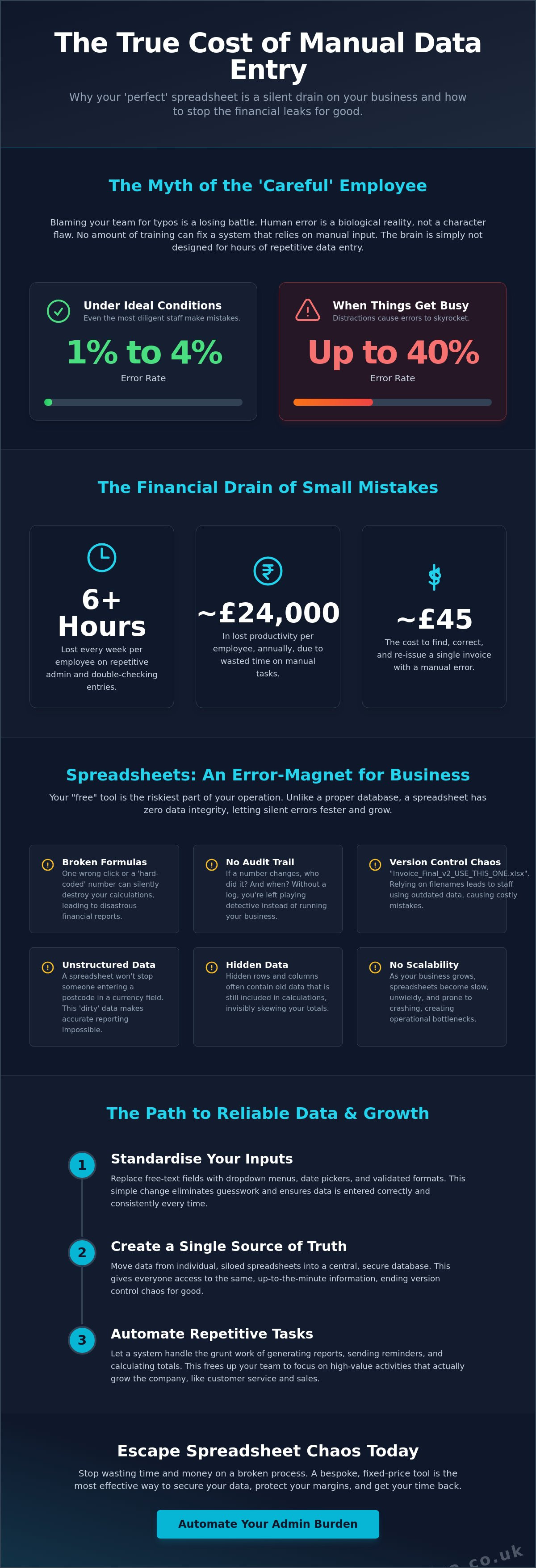

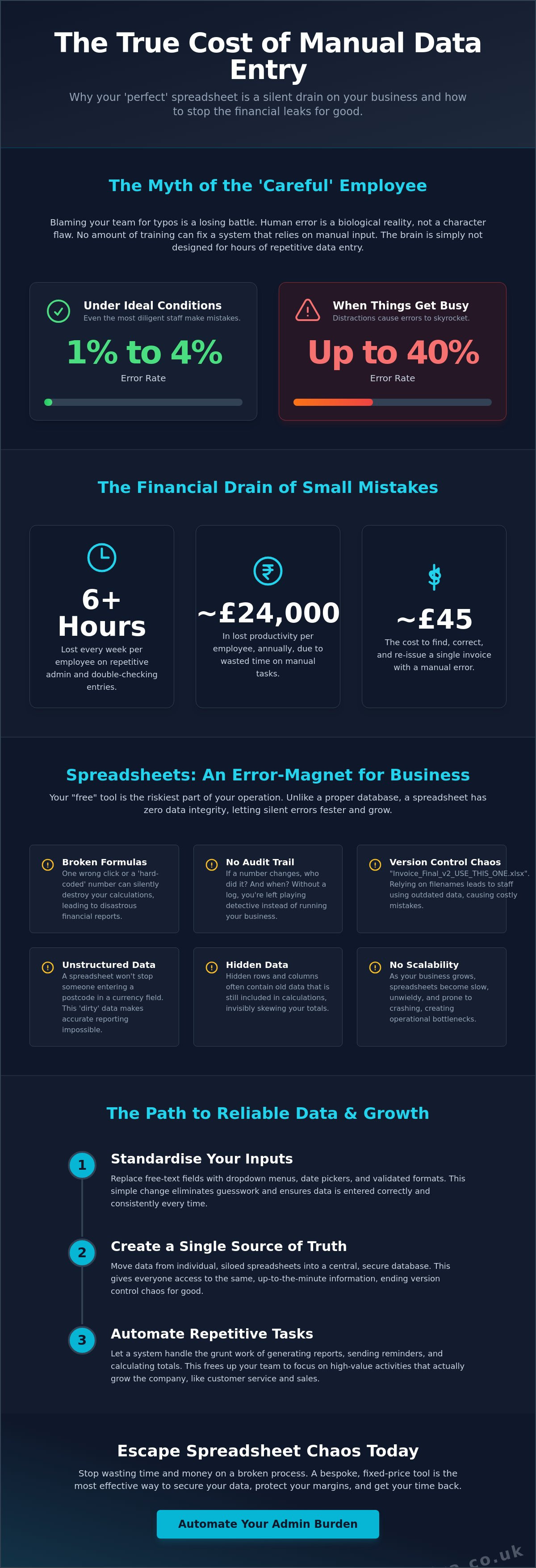
That "perfect" spreadsheet you rely on is actually a silent drain on your bank account. You probably spend hours every week double-checking staff entries because you're terrified a hidden formula error or a rogue typo will ruin your margins. It's a massive burden. If you've been searching for how to stop manual data entry errors, you've likely realised that telling people to "be more careful" just doesn't work. Research shows that even diligent staff make mistakes between 1% and 4% of the time; when things get busy, that rate can skyrocket to 40%.
You aren't alone in this frustration, but you don't have to live with it. Most independent operators lose over 6 hours every week to repetitive admin tasks that could be handled by a simple, automated system. This article will show you why "trying harder" is a losing battle and how to automate these headaches out of your business for good. We'll explore the practical steps to get your time back, ensuring your data is reliable for VAT and tax purposes whilst you focus on actually growing the company.
Key Takeaways
- Stop blaming your team for typos. Human error is a biological reality, and no amount of training can fix a system that relies on manual input.
- Spreadsheets are silent margin killers. Between broken formulas and version confusion, your current "free" tools are likely the riskiest part of your business.
- Discover how to stop manual data entry errors by standardising your inputs and moving data from individual silos to a single source of truth.
- Protect your reputation and your sanity. Reliable data means no more awkward invoice corrections or the usual panic when tax season rolls around.
- Learn why simple, fixed-price custom tools are the most effective way to automate the admin burden away for good.
The Myth of the Careful Employee: Why Training Won’t Stop Errors
Stop blaming your team for the typos in last month's inventory report. It is easy to think that more training or a stern talk about "attention to detail" will fix the problem. It won't. Manual data entry errors are a structural failure of the tools you use, not a character flaw in your staff. Humans are simply not built for the grind of repetitive typing. We are creative, social, and excellent at solving complex problems, but we are biologically unsuited for staring at rows of numbers for eight hours a day.
The reality of Data entry is that "fat-fingering" a key is inevitable. It is a biological certainty. Research shows that even the most focused person makes mistakes at a rate of 1% to 4% under ideal conditions. When the office gets loud or the phones start ringing, that error rate can jump to a staggering 40%. Telling someone to "be more careful" is like telling them not to blink. It is an effort-led approach that eventually fails because human effort is a finite resource. If you want to know how to stop manual data entry errors, you have to move toward system-led accuracy instead.
The Psychology of Repetitive Tasks
When a task is dull, the brain naturally switches off to save energy. This is why your best staff member can type a "9" instead of a "0" without even noticing. In a busy UK office, this is compounded by constant multi-tasking. Transposition errors, where two numbers are swapped around, happen precisely because the mind is already thinking about the next task. It isn't laziness. It is just how we are wired. You cannot train the human brain to ignore its own biology. If you want to know how to stop manual data entry errors, you must stop asking humans to act like machines.
Why "Trying Harder" is a Waste of Resources
Think about the mental cost of "checking culture." If your staff spend 20% of their time double-checking their own work, you have effectively hired 80% of a person. It slows everything down. This constant second-guessing creates a bottleneck in your operations and breeds a culture of anxiety. Workers can spend over 6 hours every week on these repetitive tasks, which costs a company approximately $28,500 per employee annually in lost productivity.
Your team's time is far too valuable to be wasted on data validation. A single invoice error can cost up to $53.50 to fix once you factor in the time taken to find and correct it. Rather than throwing more labour at the problem, the solution lies in changing the process. Shifting from a "checking culture" to an automated one allows your staff to focus on customer service and growth rather than hunting for typos in a spreadsheet.
Why Spreadsheets are Error-Magnets for Small Businesses
If you are still using Excel to manage your core operations, you are playing a dangerous game. It feels free, but it is an error-magnet. Unlike a structured database, a spreadsheet has zero "data integrity." It won't stop you from typing a postcode into a currency cell. It just sits there, quietly letting the chaos grow. This is a primary reason why figuring out how to stop manual data entry errors is so difficult when you are stuck in a "grid" mindset. At scale, it is estimated that 18% to 40% of records in these systems contain mistakes.
There is also the issue of accountability. If a cell value changes and your margins suddenly look thin, who did it? Was it an accidental drag-and-drop? A deleted row? Without an audit trail, you are left playing detective. You need a system that tracks who changed what and when, rather than a file that anyone can break with a single keystroke. Some of the most common "hidden" dangers include:
- Unlabelled cells: New staff guessing what data goes where because there are no clear instructions.
- Hidden rows: Calculations running on old data you can't even see, skewing your totals.
- Broken links: Files that only work on one specific computer and "break" when shared.
The "Ghost in the Machine": Broken Formulas
One accidental tap of the spacebar can kill a complex formula. It is a silent disaster. Often, staff start "hard-coding" numbers directly into cells meant for calculations just to make the sheet work for one specific job. This bypasses the logic of the tool entirely. Recognising when to move from excel to a database is the first step toward securing your business's future. It moves you from a fragile file to a robust, reliable system.
Version Control Chaos
We've all seen it. The folder full of files named "Price_List_FINAL," "Price_List_FINAL_v2," and "Price_List_USE_THIS_ONE." It is a nightmare. If a staff member uses an outdated version of an automated quoting tool, you could be losing profit on every single job before you've even started. Manual processing already costs an average of $15 per document. You don't need to add the cost of using the wrong data on top of that.
Then there is the security risk. Sensitive client data sitting in an unencrypted email attachment is a massive headache waiting to happen. Moving away from manual file sharing isn't just about efficiency. It is about protecting your reputation. When everyone works from a single source of truth, the version control nightmare simply disappears. You get your time back, and your data stays exactly where it should be.
The True Cost of "Small" Mistakes in Your Business
A small typo is never just a typo. It is a "leaky bucket" that slowly drains your profit throughout the financial year whilst you are busy trying to keep things running. Learning how to stop manual data entry errors isn't just about saving a few minutes here and there. It is about saving your business from death by a thousand cuts. When your data is unreliable, every decision you make is a gamble. You are essentially flying blind, hoping that the numbers in your spreadsheet actually reflect the reality of your bank balance.
Mistakes in your records create a ripple effect. If you are constantly chasing how to stop manual data entry errors, you already know the frustration of fixing the same invoice twice. But the damage goes much deeper than your daily schedule. It hits your reputation, your legal safety, and even your team's morale. These "small" slips eventually add up to a massive administrative burden that prevents you from focusing on growth.
Reputation and the Bottom Line
Think about the last time you had to call a client to "correct" a quote or an invoice. It is an awkward conversation. It makes you look unorganised and amateur. In a competitive market, that lack of professionalism can be the difference between a repeat customer and a lost lead. These errors also lead to massive waste in your operations. You might find yourself ordering stock you already have sitting in the warehouse because an inventory sheet wasn't updated correctly. That is hard-earned cash tied up in boxes rather than sitting in your business account.
The Compliance Burden
Then there is the stress of HMRC. For UK independent operators, accurate record-keeping for VAT and tax purposes is a heavy weight. If your records are a mess of manual entries and "best guesses," an end-of-year audit becomes an expensive, high-stakes nightmare. You shouldn't have to spend your weekends hunting for a missing discrepancy in a sea of cells. Digital records provide a clean, traceable trail. It ensures you meet your legal obligations without the usual end-of-quarter panic.
Perhaps the most overlooked cost is staff turnover. Repetitive, soul-destroying admin work is a primary reason why good people quit. A 2026 report indicated that 72% of employees would prefer to use the time saved through automation to perform more valuable work for their organisations. When you force talented staff to spend hours every week on data validation, they feel undervalued. They get bored. Eventually, they look for a job where their skills are actually used. Replacing a reliable employee is a massive expense. Automating the drudgery isn't just a tech upgrade. It is a retention strategy that keeps your team engaged and focused on the customer.
Three Practical Steps to Stop the Rot
You have seen why the "try harder" method fails. Now, let’s look at how to stop manual data entry errors by changing the game entirely. You need a system that makes it physically impossible to get things wrong. It sounds like a big task, but it usually comes down to three practical shifts in how you handle information. By removing the human element from the most dangerous parts of your workflow, you protect your margins and your sanity.
- Step 1: Standardise and restrict. Stop letting people type whatever they want into a cell. Use dropdowns and mandatory fields to ensure data is clean before it is even saved.
- Step 2: Centralise. Move your data out of individual "silos" like private spreadsheets or paper notebooks. Everyone should work from a single source of truth.
- Step 3: Automate. Capture data at the source. If a staff member is on-site, they should log the job there and then, rather than waiting for a Friday afternoon data dump.
Standardisation: Locking the Door on Errors
Input masks are your best friend. If a field only accepts a date, a staff member cannot accidentally type "ASAP" or "next Tuesday." This simple restriction stops about 50% of common errors instantly. Dropdown menus are equally powerful. They prevent three different spellings of the same client name from cluttering your records. If you are still using clipboards and pens, Digital Form Conversion is the easiest win for your business. It turns a messy paper trail into a clean, digital stream of reliable data.
Automation: Data Entry Without the Entry
The best way to avoid mistakes is to stop typing altogether. Automated systems can achieve an accuracy rate of 99.9%, which is a world away from the "best guess" approach of a tired employee. Mobile apps allow your field staff to log work, snap photos, or scan barcodes instantly. This removes the "middleman" of office admin. When information is captured via a "select" or "scan" action rather than "typing," the risk of a typo vanishes.
This is especially true for complex tasks like equipment logs. Using a system for tracking assets and equipment automates your inventory checks. It ensures that what you see on your screen matches what is actually on the shelf. You get a business that runs smoothly without constant supervision. If you are ready to ditch the spreadsheets and build something that actually works, a Custom CRM Software solution can centralise everything into one reliable hub.
Bespoke Apps: The Fixed-Price Solution to Data Chaos
By now, the answer to how to stop manual data entry errors is clear. You have to stop relying on luck and start relying on a system built specifically for your business. At SIMPLIXA, we believe software should be simple, helpful, and affordable. We don't do corporate fluff or over-engineered features you will never use. We focus on utility. We build tools that lift the administrative burden off your shoulders so you can get back to the work you actually enjoy. It is about moving from a state of being overwhelmed to a state of complete organisation.
The "Fixed-Price" model is the heart of what we do. Traditional agencies often hide behind hourly fees and runaway budgets that make independent operators nervous. We don't. We provide a clear, honest price upfront. No hidden costs. No nasty surprises. Whether you need an Inventory Management System or an Automated Quoting Tool, you will know exactly what you are paying before we even start. It is a fair way to do business, and it ensures our goals are perfectly aligned with yours.
Why Bespoke is Now Within Reach
There is a common myth that custom software takes years to build and costs a fortune. That is outdated thinking. Modern development allows us to deliver punchy, effective tools in a fraction of the time it used to take. You don't need a bloated system that tries to do everything. You need a Custom Staff Tracking App or a Client Booking System that does exactly what *your* team needs it to do. This tailored approach provides a level of peace of mind that generic, off-the-shelf software simply cannot match. It fits your workflow like a glove.
Your Next Steps to Error-Free Operations
The first step to fixing the chaos is identifying the one process in your business that causes the most grief. Is it the end-of-month invoicing? Is it the messy paper trail in the warehouse? Once you find that "mental irritant," you can start to remove it. We use a dedicated Discovery Phase to map out your digital success, ensuring every button and field serves a purpose. This eliminates the guesswork and ensures your new system is a tool for growth, not another obstacle to manage.
You have struggled with spreadsheets for long enough. They served a purpose once, but now they are just holding you back. It is time to replace the "fat-finger" risks with a system that works as hard as you do. Reliable data for VAT, accurate quotes that protect your profit, and more free time to focus on your customers are all within reach. Ready to kill the spreadsheet? See how our fixed-price apps can help.
Ditch the Spreadsheet Stress for Good
You've seen why the "perfect" spreadsheet is a myth. It is a fragile tool that invites mistakes and drains your team's energy. Accepting that human error is inevitable is the first step in learning how to stop manual data entry errors. You can't train biology out of your staff. You can, however, build a system that protects your margins. Moving from "effort-led" to "system-led" accuracy isn't just a technical upgrade. It's a way to reclaim your weekends and stop worrying about HMRC audits.
We specialise in the fast delivery of bespoke tools that actually fit your workflow. With our UK-based support and fixed-price certainty, you can automate the admin burden away without worrying about runaway costs. Stop wasting time fixing errors. Get a fixed-price quote for your custom app today.
It's time to stop playing detective with your own data. Let's get your business running as smoothly as you always imagined. You've done the hard work of building the company. Now, let's build the system that lets it grow.
Frequently Asked Questions
Is it really possible to eliminate all data entry errors?
No system can promise absolute perfection, but you can get remarkably close. Whilst humans are biologically prone to error rates of up to 4%, automated systems can achieve an accuracy rate of 99.9%. By removing the need for staff to type out long strings of data and replacing it with "selecting" or "scanning," you remove the opportunity for mistakes to happen. It is about reducing risk to near-zero.
How much does it cost to automate my manual data entry in the UK?
We provide fixed-price certainty for every project rather than charging by the hour. This approach helps independent operators budget without the fear of costs spiralling out of control. Every business has different needs, so we focus on the specific administrative burden you want to remove. You get a clear, honest price upfront for a tool that is built entirely for your utility.
Will my staff find a custom app harder to use than Excel?
Staff usually find a custom app far easier to use because it is designed for their specific job. Excel is a blank grid that requires a lot of guesswork and "being careful" with formulas. A custom tool uses clear buttons, dropdowns, and mandatory fields to guide the user. It simplifies the workday and removes the anxiety of accidentally breaking a spreadsheet formula with one wrong keystroke.
How long does it take to build a bespoke tool to replace my spreadsheets?
Modern development is much faster than the old projects of the past that took years to complete. We focus on delivering punchy, effective tools that solve your most pressing problems quickly. The aim is always to get you up and running with a reliable system as soon as possible. This speed allows you to start seeing the benefits of a streamlined operation without a long wait.
Can a custom app link to my existing accounting software?
Yes, connecting to tools like Xero or QuickBooks is a common way to ensure your data stays consistent. This is a vital part of how to stop manual data entry errors across your whole business. By linking your custom tool directly to your accounts, you stop the need for "double entry." This prevents the common mistakes that usually happen when copying data from a spreadsheet into your tax records.
What happens if our business process changes after the app is built?
Custom software is designed to be flexible and can be updated as your business evolves. Unlike pre-built software that forces you into a rigid template, a bespoke tool is built to grow with you. If you change how you track staff or manage inventory, we can adjust the system to match. It is a long-term solution that adapts to the real-world environment of your service-based business.
Is my business too small for custom software?
If you are losing hours every week to admin or worrying about margin errors, you aren't too small. Custom software isn't just for massive firms with huge budgets. We specialise in helping small-scale operators who need professional, reliable tools without the complexity of enterprise systems. If a manual process is causing you stress or costing you money, it is worth fixing with a proper digital solution.
How do I know which manual process I should automate first?
Start with the task that causes the most "mental irritation" or the highest financial risk. This is usually the area where staff spend the most time double-checking entries, such as an Automated Quoting Tool. Fixing the biggest bottleneck first provides the most immediate sense of relief. Once you understand how to stop manual data entry errors in one area, you can slowly expand that organisation to the rest of the business.