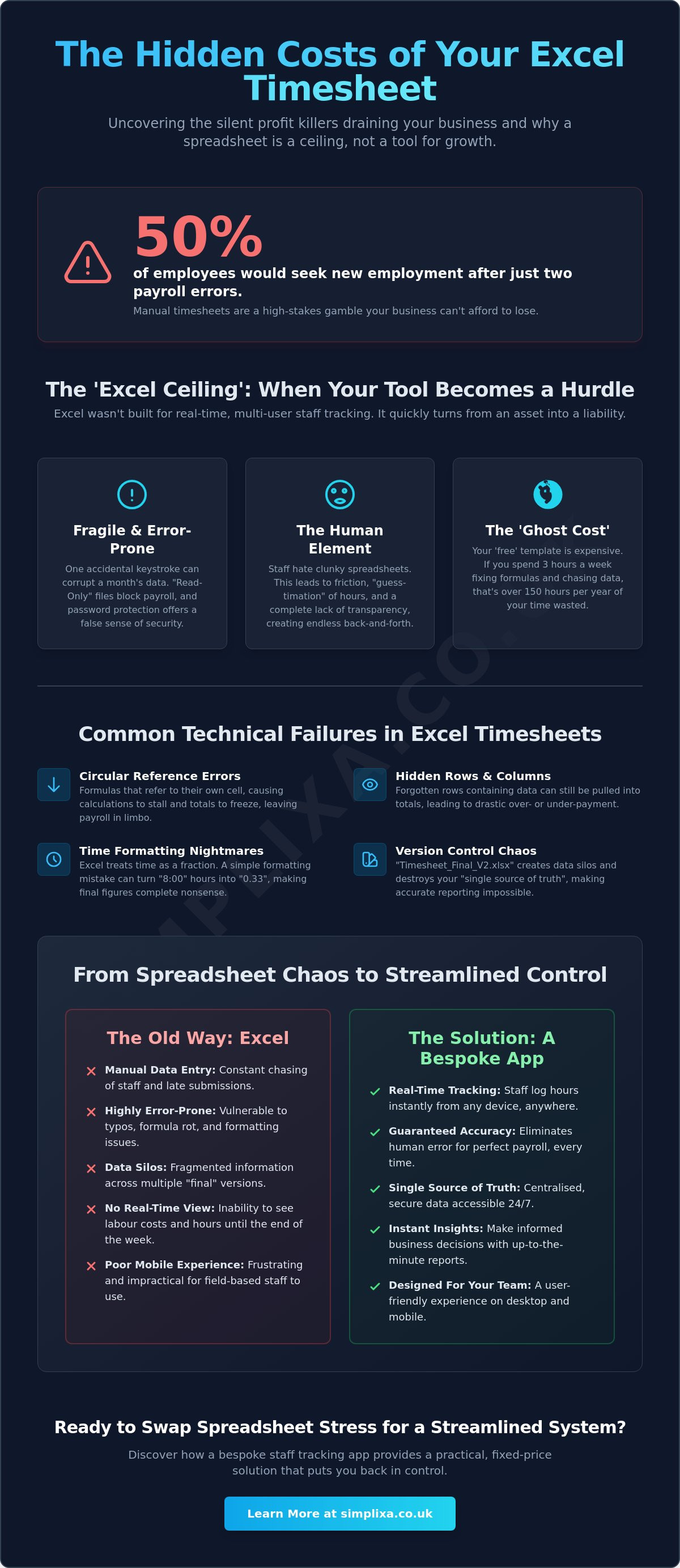

Your Excel timesheet isn't just a spreadsheet; it's a silent thief stealing hours from your week. If you're spending your Friday nights squinting at broken formulas, you're likely facing the same tracking employee hours on excel template issues that drain the life out of most independent businesses. It's frustrating to chase staff for manual entries whilst knowing that human error has turned your payroll into a nightmare. You're not alone in feeling that spreadsheets have become a ceiling rather than a tool for growth.
The stakes are higher than you might think. Research from June 2026 shows that half of employees would seek new employment after only two payroll errors. That's a risk your business simply can't afford. This guide reveals why your current timesheet is failing and how to swap spreadsheet stress for a streamlined system. We'll look at the hidden costs of manual data entry and show you how a custom staff tracking app provides the accurate, real-time data you need to finally focus on growth.
Key Takeaways
- Spot the exact moment your spreadsheet turns from a helpful tool into a growth-stunting hurdle for your business.
- Uncover the hidden tracking employee hours on excel template issues, like circular references and skewed rows, that lead to expensive payroll mistakes.
- Calculate the "Ghost Cost" of your time to see how much money is wasted whilst you're stuck fixing broken formulas.
- Learn how to audit and clean your existing data to ensure a smooth transition from manual sheets to a streamlined system.
- Discover how a bespoke staff tracking app provides a practical, fixed-price solution that puts you back in control of your day.
The Real Issues with Tracking Employee Hours on Excel Templates
You probably started with a spreadsheet because it was easy. It was free, familiar, and sat right there on your desktop. But as your team grew, that simple file started to feel like a heavy weight. This is the "Excel Ceiling." It's the exact moment your template stops being a tool and starts being a hindrance. You're no longer managing a team; you're managing a file. It's a common trap for independent operators who need to move fast but find themselves stuck in a digital bog.
Then there's the "Friday Afternoon Dread." You know the feeling. It's 4:00 PM and you're chasing staff for their hours whilst squinting at a grid that doesn't quite add up. Before we dive into the technical mess, it helps to understand what a timesheet is at its core: a vital record of your most expensive resource. When that record lives in a fragile Excel file, your entire payroll foundation is built on shaky ground. These tracking employee hours on excel template issues aren't just minor annoyances. They are silent profit killers.
The "free" price tag is a myth. If you spend three hours every week fixing broken formulas or merging different versions of the same file, that template is costing you hundreds of pounds in lost time. You end up with data silos amongst different departments, where nobody is quite sure which version of the "Master Sheet" is actually the latest one.
The Fragility of the Spreadsheet
Excel wasn't built for multi-user, real-time tracking. One accidental keystroke from a tired employee can wipe out a whole month of data in a blink. Then there's the nightmare of "Read Only" files. You need to run payroll, but you can't open the sheet because someone else left it open on their laptop before heading to a job site. Don't rely on password protection for security either. It's a thin veil that won't truly protect sensitive staff data or prevent a determined user from breaking your carefully crafted columns.
The Human Element: Why Staff Hate Templates
Your team wants to do their jobs, not struggle with a clunky spreadsheet. The friction of manual entry leads to "guess-timation." If it's hard to log hours, staff wait until Friday and try to remember what they did on Monday. Accuracy goes out the window. Most templates are a nightmare on a mobile phone, making life difficult for field-based staff. There's also a total lack of transparency. Employees can't easily see their own accumulated hours, leading to constant questions and unnecessary back-and-forth that eats up even more of your day. Solving these tracking employee hours on excel template issues is the first step toward getting your time back.
Common Technical Failures in Employee Timesheet Templates
The moment you move beyond a handful of staff, the technical cracks in your spreadsheet start to gape. These tracking employee hours on excel template issues aren't just minor glitches; they are fundamental failures in how Excel handles complex data. One of the most common culprits is the circular reference error. This happens when a formula accidentally refers to its own cell, causing the entire calculation engine to stall. Suddenly, your totals don't update, and you're left guessing who is owed what.
Then there is the danger of hidden rows and columns. It's easy to hide a row whilst tidying up a sheet, only to forget that the data inside is still being pulled into the final payroll figure. You might be paying for hours that don't exist, or worse, underpaying a loyal worker because their overtime was tucked away in a collapsed cell. Formatting is another nightmare. Excel often treats time as a fraction of a 24-hour day. You type "8:00" for an eight-hour shift, but a stray formatting change turns it into "0.33". If your totals are based on these decimals, your final figures will be complete nonsense.
Version control chaos is the final straw for many operators. We have all seen it: "Timesheet_Final_V2_Actual_FINAL.xlsx" sitting in a shared folder. When multiple people edit the same file, you lose the "single source of truth." You end up with fragmented data scattered across different versions, making it nearly impossible to provide an accurate report for tax or compliance purposes.
Formula Rot and VLOOKUP Nightmares
As you add more employees, your formulas have to work harder. This leads to "formula rot," where complex strings of VLOOKUPs or nested IF statements become too brittle to touch. One person changes a cell reference, and the whole house of cards collapses. Hard-coded values are another trap. If a manager manually overrides a formula to "fix" a one-off error, that calculation is now dead. You won't know it's broken until the end of the year when the numbers don't balance. If you're constantly "fixing" cells just to get through the week, your system has become too complex to manage safely.
Data Integrity and GDPR Risks
Storing sensitive staff information in unencrypted spreadsheets is a massive legal gamble. There is no real audit trail in a standard template; you can't see who changed an entry, why they changed it, or when. This lack of transparency is one of the major risks of spreadsheets for critical business processes, especially when it comes to GDPR compliance. Relying on these outdated methods means manual data entry is a hidden profit killer that drains your resources and exposes you to unnecessary risk. If these technical headaches are slowing you down, it might be time to look at a custom staff tracking app that handles the heavy lifting for you.
Excel vs. Custom Apps: Calculating the Real Cost
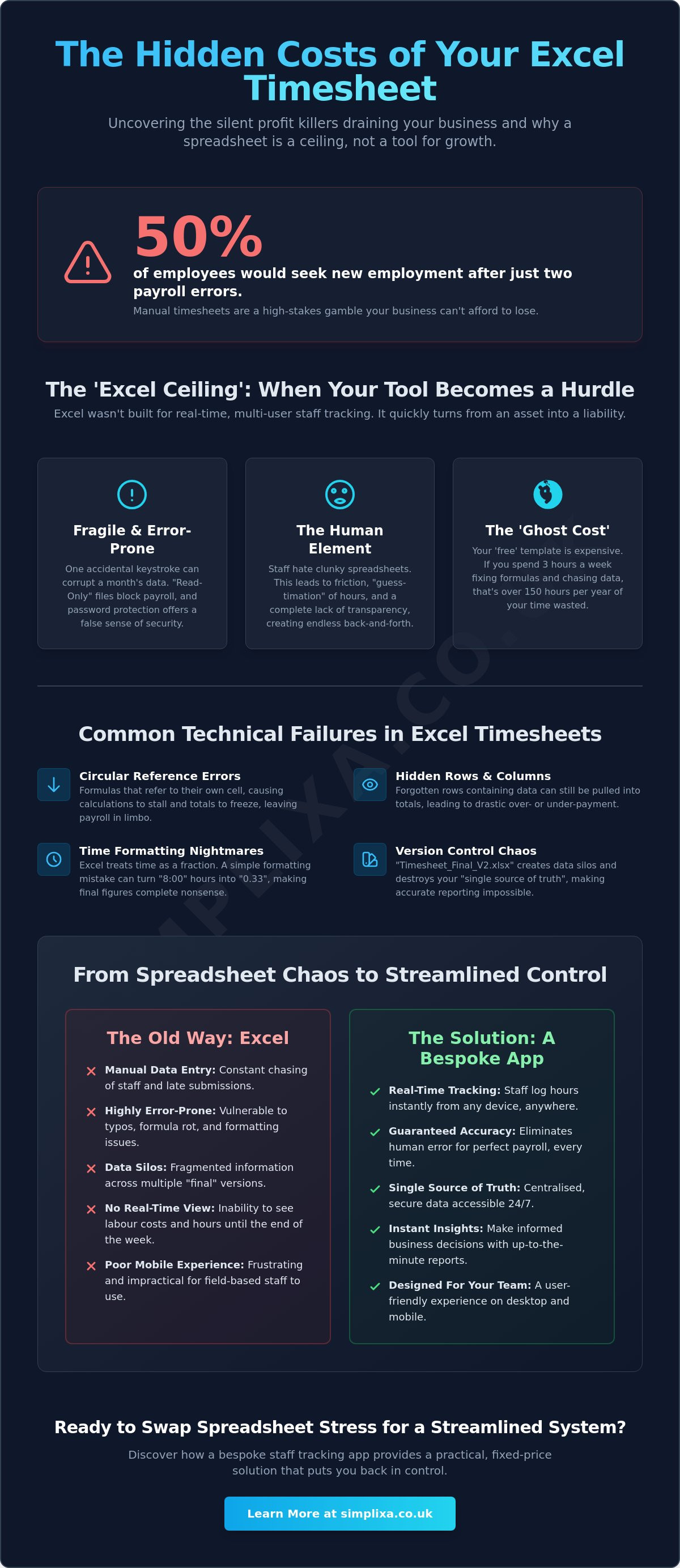
Stop thinking of your spreadsheet as a free tool. It's actually one of your most expensive overheads. When you tally up the hours spent wrestling with tracking employee hours on excel template issues, the numbers are eye-watering. You're likely paying a "Ghost Cost" every single week. What's your hourly rate? If you're the boss or a senior manager, your time is far too valuable to be spent fixing broken cells or chasing missing data. Spending three hours a week on spreadsheet triage isn't just annoying; it's a direct drain on your bank account.
Then there's the accuracy gap. A tiny 1% error in manual entry might seem small. On a monthly payroll of £20,000, that’s £200 gone. Over a year, you’ve lost £2,400 to simple human error. That's money that should be in your pocket, not lost to a typo. Scalability is the real killer, though. Excel might behave for two or three staff. Once you hit ten or twenty, the file starts to crawl. It becomes a bottleneck that stops you from growing because the admin burden scales faster than your revenue.
You need real-time visibility. Waiting until Monday to see last week's mistakes is like driving whilst only looking in the rear-view mirror. You can't make proactive decisions if your data is always seven days old. It also makes it incredibly difficult to stay on top of FLSA recordkeeping requirements, leaving you open to legal headaches you simply don't need.
The Myth of the "Free" Template
Many SMEs stick with Excel out of a false sense of frugality. You think you're saving money by not buying software. In reality, you're paying for it every single day in lost productivity and stress. What's the price of your peace of mind? We call it the "Relief Factor." It’s the sheer value of knowing your data is organised and your Friday afternoons are actually yours again. True frugality means choosing the system that costs the least in the long run, not the one that's free today.
Bespoke Software: Not Just for the Giants
You don't need to be a corporate giant to have tools that actually work. Custom tools are designed to mirror your exact business process. No bloat. No useless features. Just pure utility. Plus, with fixed-price development, you get total budget certainty. Beyond the daily relief, these bespoke systems create saleable value for your company. An organised business with automated systems is worth far more to a future buyer than one held together by messy, fragile spreadsheets.
How to Transition from Excel to a Streamlined System
Transitioning away from a spreadsheet isn't about learning a complex new skill; it's about unlearning a bad habit. You need a clean break from the tracking employee hours on excel template issues that have plagued your Friday afternoons for far too long. Start by auditing what you actually need to track. Most businesses collect mountains of "junk" data simply because their old template had a column for it. Strip your process back to the absolute essentials: hours worked, job codes, and breaks. If a data point doesn't help you run payroll or quote more accurately, bin it.
Clean your data before you move a single row. Don't carry over broken formulas or records for staff who left your business years ago. This is your chance to start fresh. Once you've chosen a new tool, run it alongside your old spreadsheet for one or two pay cycles. This "parallel run" is your safety net. It proves the new system is accurate and gives you the confidence to finally delete that clunky Excel file for good. It's about building trust in the numbers again.
Training your team is the final piece of the puzzle. Don't just tell them they have to use a new tool; show them how it makes their lives easier. If a field worker can log their shift in three taps on a mobile phone instead of wrestling with a spreadsheet, they'll actually use it. When the system is easier for the worker, the data is more accurate for the manager. It's a win for everyone involved.
Step 1: Mapping Your Workflow
Identify the exact pain points in your current collection method. Do you have field-based staff who struggle to access the office network? Are you drowning in "Read Only" file errors? You need to define who needs access and what level of permission they require. A site foreman might need to see his team's hours, whilst a junior apprentice only needs to see their own. Mapping these permissions now prevents security headaches later.
Step 2: Choosing Your Solution
Generic SaaS apps often come with bloated features you'll never use. For many SMEs, a custom-built solution is the better way out. You want a no-nonsense tool that solves your specific problem without adding unnecessary complexity. Ensure the system is flexible enough to grow with your business goals. You don't want to hit another "ceiling" in twelve months' time. If you're ready to stop the spreadsheet stress, we can help you build a custom staff tracking app that fits your business perfectly.
Simplixa: Bespoke Staff Tracking Without the Agency Price Tag
We don't believe in overcomplicating things. Most software agencies want to sell you a massive, bloated project with an intimidating price tag to match. Simplixa is different. We focus on real UK businesses that are tired of fighting with their data. We've seen every possible tracking employee hours on excel template issues, from broken VLOOKUPs to files that simply won't open on a Friday afternoon. Our approach is grounded in reality. We build practical, easy-to-use apps that solve your specific problems without the corporate fluff.
One of the biggest worries for independent operators is the "runaway cost" of custom software. We've binned that model entirely. With Simplixa, you get fixed-price certainty. You'll know exactly what you're paying upfront with no hidden hourly fees or nasty surprises down the line. We replace your messy, fragile spreadsheets with a single, digital "source of truth." This isn't just about software; it's about giving you your time back. You get local support from a partner who actually understands the UK SME landscape and the daily pressures you face.
Custom Tools Built for Utility
We focus on what actually matters to your bottom line. Our custom staff tracking apps are built for utility, not just aesthetics. We prioritise the features you'll use every day: tracking hours, managing shifts, and slashing your admin time. By replacing those "mental irritants" with automated, reliable digital processes, we clear the path for your business to grow. We also move fast. We focus on getting your new system live whilst your competitors are still typing data into broken spreadsheets. Efficiency is our ultimate promise.
Ready to Kill the Spreadsheet?
Moving from being overwhelmed to completely organised is a choice. You can keep patching up that old template, or you can find a permanent fix that scales with you. The transition is easier than you think. We start with a simple discovery phase to understand how your business actually breathes. No jargon. No complex manuals. Just a system that works the way you do. If you're ready to leave those tracking employee hours on excel template issues in the past, book a chat with Simplixa today. Let's get your business organised for good.
Reclaim Your Time and Your Sanity
Struggling with a clunky spreadsheet is a choice you no longer have to make. We've seen how the "Excel Ceiling" stunts growth and how simple formatting errors turn payroll into a weekly battle. These tracking employee hours on excel template issues don't just waste time; they drain your profits and keep you from focusing on the real work of growing your business. It's time to swap that mental irritant for a system built to last.
Moving to a digital "source of truth" provides the real-time data you need to make confident decisions. You deserve a tool that works as hard as you do without the hidden costs of manual entry. At Simplixa, we specialise in fixed-price projects designed specifically for UK small businesses. We offer fast delivery and reliable ongoing hosting support to ensure your transition is as smooth as possible. If you're ready to find your permanent fix, you can replace your broken spreadsheets with a custom app from Simplixa today. Your more organised, stress-free future is just one conversation away.
Frequently Asked Questions
Is it legal to track employee hours on Excel in the UK?
Yes, it's perfectly legal to use a spreadsheet for record-keeping in the UK. However, you must ensure your records are accurate and accessible to comply with HMRC and employment law requirements. If your sheet is riddled with tracking employee hours on excel template issues, you risk failing to provide a reliable audit trail during a dispute or inspection.
What are the biggest risks of using an Excel template for timesheets?
The primary risks are human error and total data fragility. A single accidental keystroke can delete an entire month of tracking without anyone noticing until payroll day. You also face security gaps because spreadsheets lack proper encryption and user-level permissions. This makes it far too easy for sensitive staff data to be seen or changed by the wrong people.
How do I fix a broken formula in my employee tracking template?
Start by checking for circular references or incorrect cell ranges in your sum totals. Formulas often break because someone inserted a new row that sits outside the original calculation range. If you find yourself constantly patching "formula rot," it's a clear sign your spreadsheet has become too complex to manage safely. It's usually better to move the data to a more stable system.
When should a small business move from Excel to a custom app?
You should make the move when the admin burden starts to steal time from your business growth. For most SMEs, this happens once you hit ten or more staff or start managing complex shift patterns. If you're spending more than two hours every week just fixing tracking employee hours on excel template issues, the spreadsheet has become a ceiling that is actively costing you money.
Can I track field staff locations with an Excel template?
Not effectively. Excel is a static tool that relies entirely on manual entry and trust. You can't verify where a worker was when they clocked in or see their location in real-time. For field-based teams, a custom staff tracking app is the only way to get accurate, location-aware data. It removes the guesswork and ensures you're only paying for time spent on the actual job site.
How much does it cost to build a custom staff tracking app for an SME?
The cost depends entirely on the specific features your business needs to run smoothly. We don't use the opaque hourly billing models that most agencies favour. Simplixa provides fixed-price certainty, so you know the total cost of your project before we even start. You get a practical tool designed for your exact workflow without paying for bloated features you'll never touch.