
You’re sat at the kitchen table on a Sunday evening, squinting at a coffee-stained job sheet and wondering if that scribble is a ‘4’ or a ‘9’. It’s doing your head in. We know the drill. Lost signatures, missing details, and the soul-destroying task of typing everything into a spreadsheet again on Monday morning is a massive drain on your energy. It's not just messy work; it's delaying your invoices and hurting your bottom line. Switching to mobile forms for field service is the only way to stop the rot and get your operations sorted.
Nobody started a business because they loved filing. You want your time back. This practical guide walks you through the steps to ditch the paperwork for good. We’ll show you how to move to custom digital forms that offer real-time visibility of every job and professional, branded reports that get you paid faster. It's time to bin the clipboards and get back to the work that actually matters.
Key Takeaways
- Stop losing money on coffee-stained job sheets and illegible scribbles that delay your invoices and cause daily headaches.
- Learn how mobile forms for field service capture GPS stamps and digital signatures to give you total on-site visibility.
- Discover how to audit your messy paperwork and design simple, thumb-friendly digital tools that actually work on a rainy site.
- Avoid the trap of bloated, off-the-shelf apps and find out why a custom-built solution fits your unique workflow better.
- Get your operations sorted with a clear path to move from admin-heavy Sundays to a streamlined, automated system.
Why Paper Forms are Doing Your Head In (and Costing You Money)
Imagine a job sheet has gone walkabout. It isn't just a bit of paper; it’s £500 of work you can't invoice until it turns up. Paper forms are a total nightmare for any growing UK business. They get wet. They get lost under the van seat. They get handed in with handwriting that looks like a doctor's prescription. Any of this hit a nerve? We know it does. It’s the daily reality of messy work that keeps you from actually growing.
This isn't just about being a bit "old fashioned." It’s a massive liability. If a client disputes a job and your only proof is a smudge of ink on a torn sheet, you're on the back foot. Inaccurate reporting leads to payment delays and, frankly, makes your business look amateur. Professionalism starts with the tools you give your team. If they're using scraps of paper, don't be surprised when the data comes back in scraps too.
Then there's the "Sunday Admin Trap." Instead of a roast or a walk, you're sat at the desk. You're typing up notes from three days ago. You're trying to remember if a scribble meant "checked" or "replaced." It’s exhausting. Moving to mobile forms for field service stops this cycle instantly. It takes the work off your plate and puts it where it belongs: in the app, as it happens.
The Real World Cost of Manual Reporting
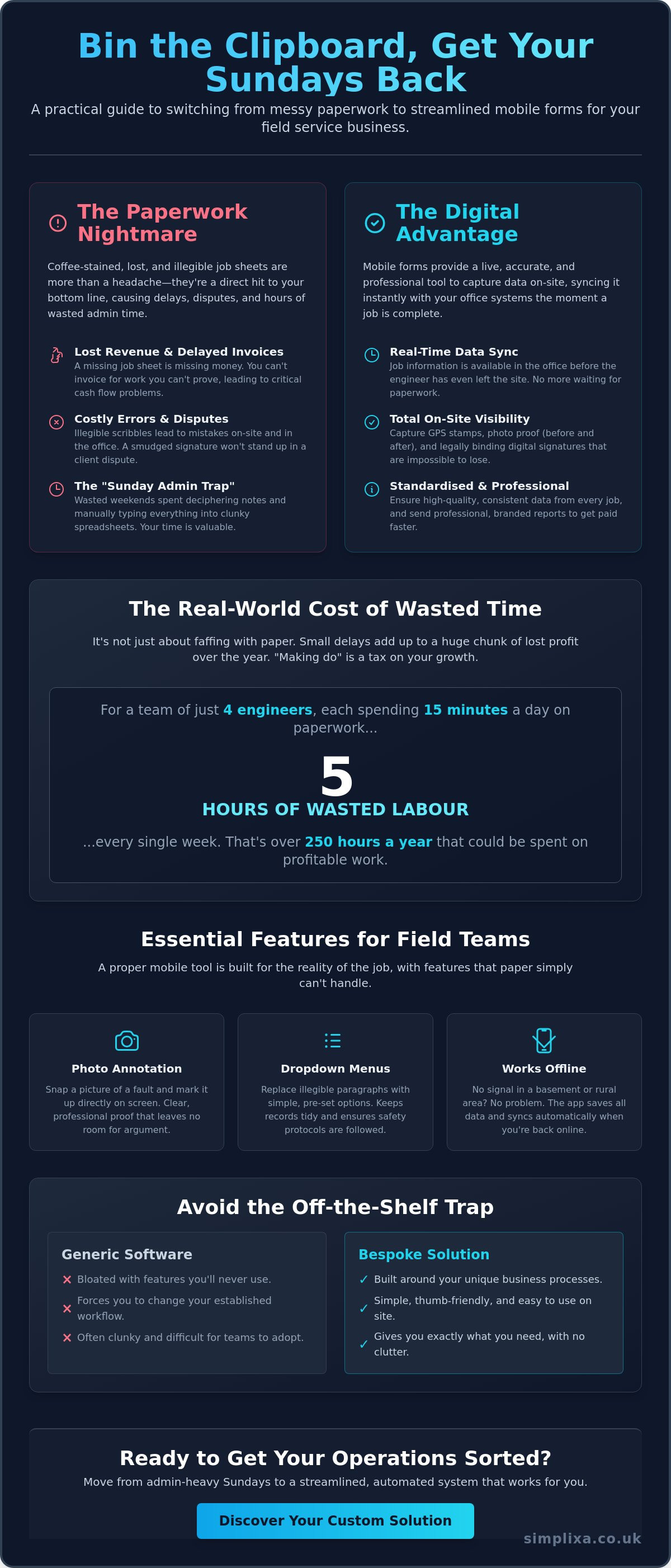
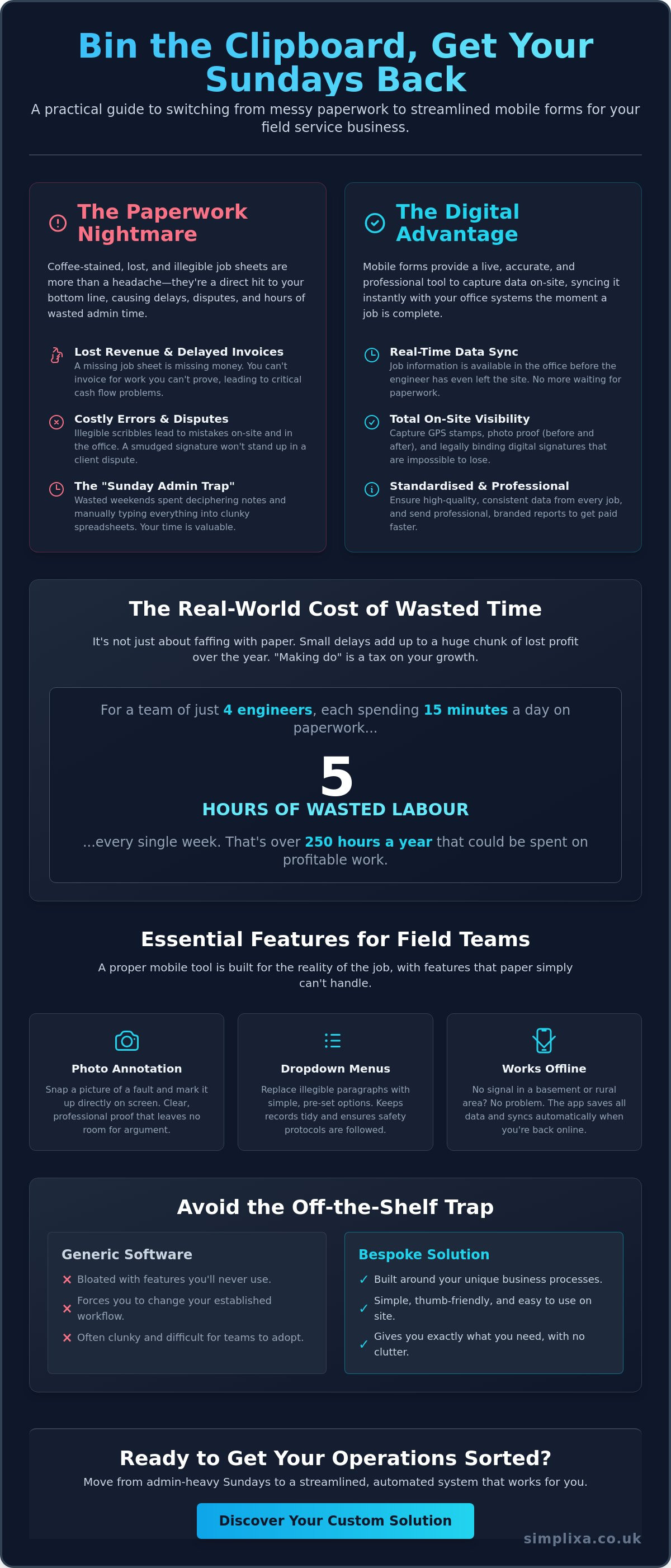
Let's talk numbers. If you have four engineers and each spends just 15 minutes a day faffing with paper or double-entering data, that’s five hours of wasted labour every single week. Over a year, that’s a huge chunk of profit gone walkabout. Missing signatures or photos are even worse. If an insurance claim pops up and you can't find the on-site proof, you're stuck with the bill. "Making do" with paper isn't a saving; it's a tax on your growth that you don't need to pay.
The Spreadsheet Struggle
Many owners try to fix this by moving everything to a spreadsheet. We hate them. Spreadsheets are the enemy of real-time field service. They’re clunky. They don't work on phones in the rain. As soon as two people edit the same file, you've got version control issues and nobody knows which one is the truth. It’s just more messy work. A proper mobile app keeps your data "sorted" from the second the engineer taps "complete." The data is clean, the photos are attached, and your Sunday is finally yours again.
What are Mobile Forms for Field Service? (Beyond Digital Paper)
Think of mobile forms for field service as more than just a digital version of that dog-eared clipboard. It isn't just a PDF you type into. It's a live tool that captures data on-site and syncs it with your office systems the second your engineer taps "submit." This means no more waiting for the van to return to the centre at the end of the day. The information is there, clean and ready to use, before the engineer has even pulled off the customer's driveway.
These tools are built for the reality of the job. They handle the stuff paper simply can't; think GPS stamps that prove your team was on-site, photo uploads that show the "before and after," and digital signatures that are legally binding and impossible to lose. When you look at the benefits of deploying field service mobile forms, the biggest win is the total lack of faff. Everything is standardised, so you get the same high-quality data from every single job, regardless of which engineer is on the tools.
You might be worried about signal. We know what UK rural areas and thick-walled basements are like. Proper mobile forms work perfectly offline. Your team can keep cracking on with their checklists and photos whilst they're out of range. The app just holds onto the data and pings it across the moment they're back in 4G or Wi-Fi territory. It’s a seamless way to get your digital form conversion sorted without worrying about the tech letting you down when you're in the middle of nowhere.
Essential Features for Field Teams
The best tools include photo annotation. This lets your team snap a picture of a boiler or a roof leak and actually mark it up on the screen to show exactly where the fault lies. It’s clear, professional, and leaves no room for argument. Dropdown menus are another lifesaver. Instead of an engineer writing a paragraph that nobody can read, they just pick from a list of pre-set options. This keeps your records tidy and ensures everyone is following the same safety protocols every single time.
How Data Flows from Field to Office
There is a massive difference between just "collecting" data and actually using it. With paper, the data is trapped until someone types it out. With mobile forms for field service, that data feeds directly into real-time dashboards. You can see exactly how many jobs were completed today, which parts were used from inventory, and which clients need an invoice sent out immediately. You aren't waiting for a pile of messy work to land on your desk on Friday afternoon. Mobile forms act as a digital bridge between the grit of on-site action and the quiet efficiency of office admin.
Step-by-Step: How to Move Your Team from Paper to Mobile Forms
Switching from paper to mobile forms for field service feels like a massive leap. You’re likely worried about the tech failing or your team moaning about "extra work." We get it. But the secret isn't in the software; it’s in the plan. You don't need a degree in IT to get this sorted. You just need to be practical about how your team actually works when they're out in the rain and short on time. It’s about moving from a state of chaos to a state of being completely organised.
If you just copy your messy paper forms onto a screen, you'll just have messy digital forms. The transition is your chance to clean up your act. By following a logical path, you can ensure that the data flowing back to your office is actually useful. No more guessing. No more chasing. Just a smooth process that lets you focus on growing your business instead of fighting fires.
Step 1: The Paper Audit
Start by grabbing every paper form you currently use. Lay them out on a table. You’ll quickly see that half the boxes never get ticked and most of the "notes" sections are just illegible scribbles that don't help anyone. This is your chance to bin the fluff. Focus only on the data that helps you invoice faster or stay compliant. By stripping away the nonsense, you’re already improving data accuracy in business before you’ve even built the app. If a field isn't essential, it’s just more messy work that slows your team down.
Step 2: Designing the User Experience
When you move to digital, you have to "design for the thumb." Your engineers aren't sat at desks with mice and keyboards. They’re on-site, often with cold hands or squinting at a screen in the bright sun. Avoid long text fields where they have to type out paragraphs. Use big buttons, tick boxes, and dropdown menus instead. If they can complete a job report with five taps and a quick signature, they’ll actually use it. Forbes notes that well-designed mobile tools lead to massive gains in productivity and efficiency because they remove the daily friction of reporting.
Step 3: Rollout and Training
Don't just announce a "go-live" date and hope for the best. Pick your most trusted engineer, the one everyone else listens to, and let them pilot the app first. When the rest of the team sees them finishing their admin in thirty seconds whilst everyone else is still wrestling with paper pads, they’ll want in. Explain that this isn't about "big brother" checking up on them; it's about taking the faff off their plate so they can get home on time. Once the pilot is done, set a firm date to bin the paper for good. Review the data every night for the first week to catch any "messy work" and tweak the forms until they’re perfect.
The Off-the-Shelf Trap: Why Bespoke Beats Generic Software
Most people start their search for mobile forms for field service by looking at the big, shiny platforms. It makes sense. They’re easy to find. But once you’re in, you realise you’re paying for 50 features you’ll never touch. It’s like buying a massive toolkit when you only need a screwdriver. You're left with a cluttered screen that confuses your team and slows everyone down. It's just more messy work, only this time it’s on a screen.
The real kicker? These apps force you to change how you work. If their system says you have to fill out Section A before Section B, that’s what you do. Even if it makes zero sense for your specific trade or the way your engineers actually operate on-site. You shouldn't have to bend your business out of shape just to fit into someone else's software. That’s not being sorted; that’s just swapping one headache for another.
Subscription Fatigue vs. One-Off Costs
Monthly fees are a slow drain on your bank account. You might start at £20 or £30 per user, per month. Then your team grows. Suddenly, you're looking at a massive bill every single month just to keep your own data accessible. If you stop paying, the lights go out. You lose the tool and the access to your records. We think that’s a bit of a liberty. Small businesses often get priced out of "Enterprise" versions just to get one specific feature they actually need. Simplixa does things differently. We focus on fixed-price projects that get you sorted without the forever-bill. You own the tool, and it stays yours.
Making the Software Fit the Business
Bespoke doesn't have to mean slow or expensive. It just means the app uses your terminology and your specific steps. If you call it a "Site Audit" and your engineers call it a "Check-list," the app should reflect that. Custom tools are built to grow amongst changing UK regulations and your own shifting needs. You get exactly what you need, nothing you don't, and a system that actually feels like part of your team. You deserve a tool that’s as hard-working as you are. Get your business properly sorted with a custom digital form plan today.
Getting Sorted: How a Custom App Streamlines Your Field Operations
You’ve seen the mess. You’ve felt the frustration of missing signatures and the Sunday night spreadsheet grind. Now, it’s time to actually fix it. Moving to mobile forms for field service isn't just about going digital; it's about getting your life back. When your field operations are properly sorted, the stress just evaporates. You stop worrying about whether a job was reported correctly and start focusing on how many more jobs you can fit into the week.
At Simplixa, we don't believe in making things complicated for the sake of it. We know the daily reality of your trade. You need tools that work in the rain, in basements, and on the move. You need a system that feels like it was built by someone who actually understands what a "messy work" day looks like. We move you from being overwhelmed by admin to being completely in control with a clear, fixed-price plan. No hidden fees. No nasty surprises. Just a tool that works as hard as you do.
The Simplixa Difference
We are the anti-agency. You won't find any "tech-bro" attitude or confusing jargon here. We don't talk about "digital transformation" when we mean "making your life easier." We build proper tools for your trade. Whilst you're out on-site or managing your team, we handle the hosting and technical support. You don't need to become an IT expert to have a professional app. Our straight-talking approach saves you time and money because we focus entirely on utility. If a feature doesn't help you get the job done faster or get paid quicker, we don't build it. It’s that simple.
- Direct communication with the people building your tool.
- Fixed-price projects that are always priced fair.
- Support that actually answers the phone when you need help.
- A tool that belongs to you, not a software giant.
Take the First Step to Paperless
The Sunday admin grind doesn't have to be your permanent reality. You can stop the rot today. Imagine a Monday morning where every job from the previous week is already invoiced, every signature is filed, and every photo is exactly where it should be. That’s the peace of mind we offer. It starts with a conversation about your specific headaches and how we can cure them. We’ll look at your current paper mess and show you exactly how it looks when it’s converted into a slick, professional app.
Don't let another week of lost paperwork eat into your profits. We offer a free, personalised app plan and a quote that stays fixed. No pressure, no sales fluff; just a practical look at how to get your business moving again. It is time to bin the clipboards for good. Get your field service sorted with a custom app and see how much time you can win back for yourself and your family.
Take Back Your Sundays and Get Sorted
Paperwork is a drain on your energy and your bank account. We've shown how moving to mobile forms for field service stops the cycle of lost job sheets and messy data. By choosing a custom tool over a bloated subscription app, you ensure the software actually fits your trade. You aren't just going digital; you're professionalising your entire operation. It means faster invoicing, happier clients, and no more faffing with spreadsheets on your day off.
At Simplixa, we keep things simple. We offer fixed-price delivery and no-nonsense British support. We build bespoke tools specifically for small teams who need to get the job done without the "tech-bro" attitude. You get a tool that belongs to you and a process that works in the real world. Any of this hit a nerve? It’s time to stop the rot and get your business properly organised. Get a free plan and quote for your mobile forms and let’s get you sorted. You’ve put in the hard graft. Now, let’s make the admin side just as effortless.
Frequently Asked Questions
How much does it cost to convert paper forms to a mobile app?
Every business is different, so we provide a free plan and quote before any work starts. Unlike off-the-shelf apps that charge you every month for every engineer, our fixed-price projects mean you own the tool. You aren't "renting" your own data. We keep costs fair and transparent from the start so you know exactly where you stand.
Do my engineers need an internet connection to use mobile forms?
No, your engineers don't need a constant connection to use mobile forms for field service. The app stores all the data, photos, and signatures locally on the device whilst they're in a basement or a rural dead zone. Once they're back in 4G or Wi-Fi range, everything pings across to the office automatically. It’s built for the reality of UK field work.
Can I capture customer signatures on a tablet or smartphone?
Yes, capturing customer signatures on a smartphone or tablet is a standard feature. It’s as simple as the client signing with their finger on the screen. The signature is then embedded into the final PDF report. This makes your job sheets professional and legally binding without a single scrap of paper going walkabout.
What happens to our old data if we switch to a mobile app?
We help you move away from the "spreadsheet struggle" by importing your existing records where possible. Whether your history is stuck in old files or digital folders, we look at the best way to get that information into your new system. You won't be starting from scratch; you'll be building on a much cleaner foundation.
Is bespoke software too expensive for a small field service team?
Bespoke software is often cheaper in the long run for small teams. You avoid the "per user" monthly fees that grow as your team does. By paying a one-off, fair price for a tool that fits your exact workflow, you save thousands over the years. You stop paying for 50 features you'll never use and focus only on what gets the job done.
How long does it take to get a custom mobile form app live?
Most custom mobile form apps are live and in your team's hands within a few weeks. We don't drag things out with endless meetings or "tech-bro" jargon. Once we've audited your paper forms and agreed on the plan, we get to work. We focus on speed and utility to get your operations sorted as quickly as possible.
Can mobile forms integrate with my existing accounting software?
Yes, our custom tools can talk to your existing accounting software like Xero or QuickBooks. Instead of typing up job sheets on a Sunday, the app can push the data directly into your invoicing system. This cuts out the messy double-entry and ensures you get paid much faster. It takes the admin work off your plate entirely.
What if my team is not very "tech-savvy"?
We build apps for real people, not software engineers. If your team can use a basic smartphone app, they can use our forms. We use big buttons, clear dropdowns, and a logical flow that matches their actual day on-site. We make the tech invisible so they can just focus on the job without it doing their head in.